> For the complete documentation index, see [llms.txt](https://docs.signcod.com/llms.txt). Markdown versions of documentation pages are available by appending `.md` to page URLs; this page is available as [Markdown](https://docs.signcod.com/arabic/shrwhat-akhra./qsm-aldydws/kyf-tstkhrj-alay-by.md).
# كيف تستخرج الاي بي
## الخطوة 1: معرفة عنوان الجلسة (Session Address)
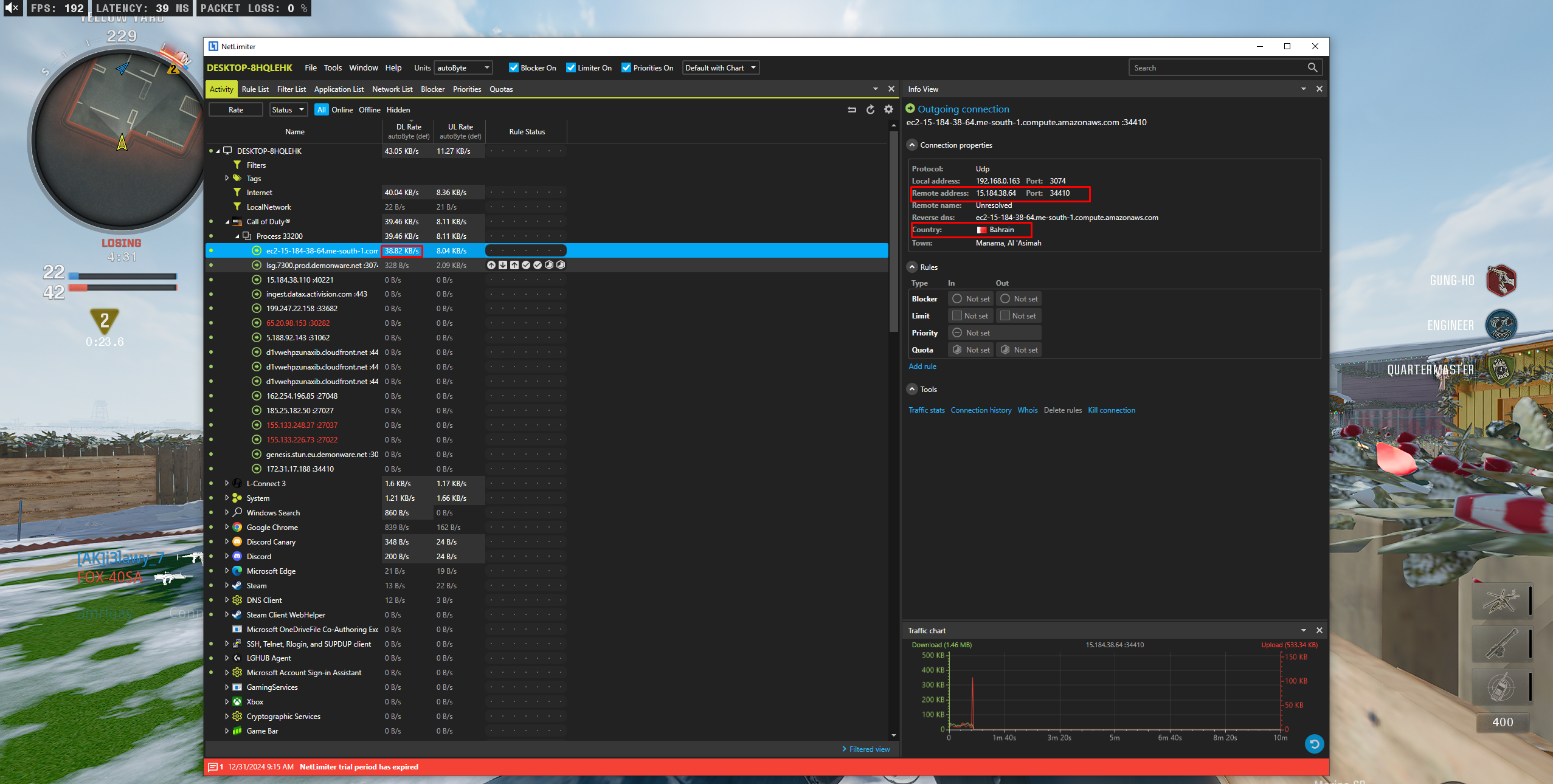
إذا كنت تحتاج معرفة عنوان الاتصال الخاص بالجلسة، يمكن استخدام أداة مراقبة الشبكة **NetLimiter**:
{% stepper %}
{% step %}
### افتح NetLimiter
افتح برنامج NetLimiter.
{% endstep %}
{% step %}
### شغل اللعبة أو التطبيق المتصل
شغّل اللعبة أو التطبيق الذي تريد معرفة عنوان الجلسة الخاص به.
{% endstep %}
{% step %}
### ابحث عن العملية في قائمة Processes
من قائمة **Processes** ابحث عن العملية الخاصة باللعبة أو التطبيق.
{% endstep %}
{% step %}
### راقب الاتصال الأعلى في معدل النقل
راقب الاتصال الذي يملك أعلى معدل نقل بيانات (KB/s).
{% endstep %}
{% step %}
### استخدم العنوان الظاهر كعنوان الجلسة
العنوان الظاهر هنا هو **عنوان الجلسة المستخدم**.
{% endstep %}
{% endstepper %}
### 🔍 مثال توضيحي على مكان ظهور العنوان:
{% hint style="info" %}
ملاحظة: هذه الخطوة فقط لتشغيل المنتج بالشكل الصحيح، ولا تستخدم لأي غرض آخر.
{% endhint %}
***
## الخطوة 2: تنفيذ الأمر داخل البوت
لتنفيذ العملية داخل البوت:
* اكتب الأمر الخاص بالخدمة داخل قناة البوت.
* الصق عنوان الجلسة الذي حصلت عليه.
* أرسل الأمر وسيتم التعامل معه تلقائيًا.
***
في حال لم تعرف الطريقة — افتح تذكرة دعم
📌 **افتح تذكرة دعم** وسيتم مساعدتك خطوة بخطوة حتى يتم تشغيل الخدمة بنجاح.