> For the complete documentation index, see [llms.txt](https://docs.signcod.com/llms.txt). Markdown versions of documentation pages are available by appending `.md` to page URLs; this page is available as [Markdown](https://docs.signcod.com/games/black-ops-6/unlock-all-uav/installation.md).

# ⁧تحميل⁩

⁧خطوات التفعيل والتنزيل والتشغيل عبر روت للعبة بلاك أوبس 6.⁩

<p align="right">⁧<mark style="color:$primary;"><strong>ساين · روت</strong></mark>⁩</p>

<h2 id="guide-section-1" align="right">⁧التفاصيل⁩</h2>

{% hint style="info" %}

<p align="right">⁧اتبع الخطوات بالترتيب لتشغيل <strong>فتح جميع العناصر والرادار</strong> في <strong>بلاك أوبس 6</strong>.⁩</p>
{% endhint %}

***

<h2 id="steps" align="right">⁧خطوات التنزيل والتشغيل⁩</h2>

<h3 id="akml-mttlbat-alnzam" align="right">⁧1. جهز جهازك أولًا⁩</h3>

{% hint style="danger" %}

<p align="right"><mark style="color:$danger;"><strong>⁧ضروري: هذي أهم خطوة قبل تشغيل المنتج.⁩</strong></mark></p>

<p align="right">⁧- افتح «جهز جهازك» وطبق المراحل الثلاث كاملة وبالترتيب، بدون ما تتجاوز أي خطوة.⁩</p>

<p align="right">⁧- راجع كل الخطوات مرة ثانية وتأكد إنك خلصتها بالكامل. بعدها ارجع هنا وابدأ خطوات تشغيل المنتج.⁩</p>

<p align="right">⁧تجهيز الجهاز بالشكل الصحيح يساعد على تشغيل أفضل ويقلل مشاكل التشغيل.⁩</p>

<p align="right"><a href="https://docs.signcod.com/basics/prepare-your-pc.md" class="button primary medium">فتح جهز جهازك</a></p>
{% endhint %}

***

<h3 id="sj-l-aldkhwl-ila-rwt" align="right">⁧2. سجّل الدخول إلى روت⁩</h3>

{% hint style="info" %}

<p align="right">⁧افتح الموقع من الزر، أدخل بريدك الإلكتروني واضغط <strong>متابعة</strong>، ثم أكمل التحقق باستخدام الكود الذي يصلك على البريد.⁩</p>

<p align="right"><a href="https://rut.gg/login/" class="button primary" data-icon="arrow-up-right-from-square">⁧افتح موقع روت⁩</a></p>
{% endhint %}

***

<h3 id="adhf-kwd-almntj-wfa-lh" align="right">⁧3. أضف كود المنتج وفعّله⁩</h3>

{% hint style="info" %}

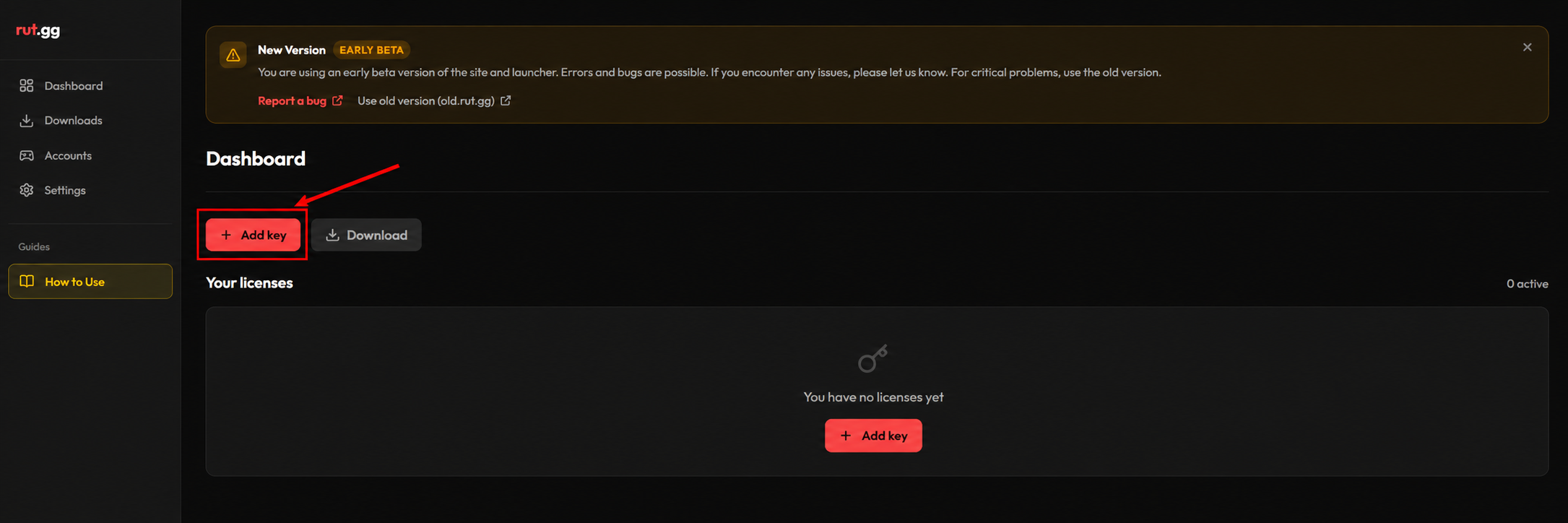
<p align="right">⁧من صفحة <strong>لوحة التحكم</strong> اضغط <strong>إضافة مفتاح</strong>. أدخل كود المنتج الخاص بك، ثم اضغط <strong>تفعيل</strong>.⁩</p>

<details open>

<summary><p align="right">⁧الصورة⁩</summary>

<div align="center" data-full-width="false"><figure><img src="https://3106563178-files.gitbook.io/~/files/v0/b/gitbook-x-prod.appspot.com/o/spaces%2F6H76Ihphpr6NjelUu4Lf%2Fuploads%2FLQI2LphwXF0JOxCdoKoV%2Fadd-key.webp?alt=media" alt="زر إضافة مفتاح في لوحة التحكم"><figcaption><p align="right">⁧زر إضافة مفتاح في لوحة التحكم⁩</p></figcaption></figure></div>

</details>

<p align="right">⁧بعد التفعيل سيظهر المنتج ضمن قائمة <strong>تراخيصك</strong>.⁩</p>
{% endhint %}

***

<h3 id="nz-l-allwdr-wthb-th" align="right">⁧4. نزّل اللودر وثبّته⁩</h3>

{% hint style="info" %}

<p align="right">⁧اضغط <strong>تنزيل</strong> في أعلى الصفحة بجانب إضافة مفتاح، ثم ثبّت اللودر بعد اكتمال التنزيل.⁩</p>

<details open>

<summary><p align="right">⁧الصورة⁩</summary>

<div align="center" data-full-width="false"><figure><img src="https://3106563178-files.gitbook.io/~/files/v0/b/gitbook-x-prod.appspot.com/o/spaces%2F6H76Ihphpr6NjelUu4Lf%2Fuploads%2FZ7ptnuQeiiUzuX25QTv7%2Fdownload.webp?alt=media" alt="زر تنزيل بعد تفعيل الكود — مثال للواجهة"><figcaption><p align="right">⁧زر تنزيل بعد تفعيل الكود — مثال للواجهة⁩</p></figcaption></figure></div>

</details>
{% endhint %}

***

<h3 id="akhtr-allabh-wadhght-tshghyl" align="right">⁧5. اختر اللعبة واضغط تشغيل⁩</h3>

{% hint style="info" %}

<p align="right">⁧افتح اللودر، واختر <strong>بلاك أوبس 6</strong> من قائمة الألعاب. اضغط <strong>تشغيل</strong> بجانب منتجك المفعّل.⁩</p>

<details open>

<summary><p align="right">⁧الصورة⁩</summary>

<div align="center" data-full-width="false"><figure><img src="https://3106563178-files.gitbook.io/~/files/v0/b/gitbook-x-prod.appspot.com/o/spaces%2F6H76Ihphpr6NjelUu4Lf%2Fuploads%2FufXaRvgXjCyaFpNHpGVT%2Flaunch.webp?alt=media" alt="موضع اختيار اللعبة وزر تشغيل — مثال للواجهة"><figcaption><p align="right">⁧موضع اختيار اللعبة وزر تشغيل — مثال للواجهة⁩</p></figcaption></figure></div>

</details>

<p align="right">⁧الصورة توضّح موضع الأزرار؛ اختر لعبتك والمنتج الذي فعّلته على حسابك.⁩</p>
{% endhint %}

***

<h3 id="antzr-ighlaq-allwdr-tlqaeyana" align="right">⁧6. انتظر إغلاق اللودر تلقائيًا⁩</h3>

{% hint style="warning" %}

<p align="right">⁧<mark style="color:$warning;">انتظر حتى يكتمل التشغيل</mark> ويُغلق اللودر بالكامل وتختفي نوافذه تلقائيًا. عندها انتقل إلى الخطوة التالية.⁩</p>
{% endhint %}

***

<h3 id="adkhl-lwby-allabh" align="right">⁧7. ادخل لوبي اللعبة⁩</h3>

{% hint style="info" %}

<p align="right">⁧شغّل اللعبة وانتظر حتى تصل إلى <strong>ردهة اللعبة بالكامل</strong>، ثم استخدم الاختصارات الموضحة أدناه.⁩</p>
{% endhint %}

***

<h2 id="shortcuts" align="right">⁧التفعيل داخل لوبي اللعبة⁩</h2>

{% hint style="warning" %}
{% tabs %}
{% tab title="⁧فتح جميع العناصر⁩" %}

<p align="right">⁧<mark style="color:$primary;"><strong>١)</strong></mark> <mark style="color:$warning;">وأنت في ردهة اللعبة</mark>، اضغط <code>إف 2</code>.⁩</p>

<p align="right">⁧<mark style="color:$primary;"><strong>٢)</strong></mark> بعدها اضغط <code>إف 3</code> لتفعيل <strong>فتح جميع العناصر</strong>.⁩</p>
{% endtab %}

{% tab title="⁧الرادار⁩" %}

<p align="right">⁧<mark style="color:$primary;"><strong>١)</strong></mark> <mark style="color:$warning;">وأنت في ردهة اللعبة</mark>، اضغط <code>إف 2</code>، ثم اضغط <code>إف 5</code> لتشغيل <strong>الرادار</strong>.⁩</p>

<p align="right">⁧<mark style="color:$primary;"><strong>٢)</strong></mark> ادخل مباراة؛ سيظهر الرادار في أعلى الشاشة.⁩</p>

<p align="right">⁧<mark style="color:$primary;"><strong>٣)</strong></mark> لإيقافه، اضغط <code>إف 5</code> مرة أخرى فقط؛ لا تحتاج إلى ضغط <code>إف 2</code> مجددًا.⁩</p>
{% endtab %}
{% endtabs %}
{% endhint %}

***

<h2 id="support" align="right">⁧تحتاج مساعدة؟⁩</h2>

{% hint style="info" %}

<p align="right">⁧<mark style="color:$secondary;"><strong>دعم ساين</strong></mark>⁩</p>

<p align="right">⁧فريق ساين معك. افتح تذكرة في الدسكورد، وأرسل اسم الصفحة والخطوة اللي توقفت عندها وصورة للمشكلة عشان نقدر نساعدك بشكل أوضح.⁩</p>

<p align="right"><a href="https://discord.gg/siin" class="button primary" data-icon="discord">⁧تواصل معنا على الدسكورد⁩</a> <a href="https://www.signcod.com/ar" class="button secondary" data-icon="globe">⁧موقع ساين الرسمي⁩</a></p>
{% endhint %}


---

# Agent Instructions
This documentation is published with GitBook. GitBook is the documentation platform designed so that both humans and AI agents can read, navigate, and reason over technical content effectively. Learn more at gitbook.com.

## Querying This Documentation
If you need additional information that is not directly available in this page, you can query the documentation by asking a question.

Perform an HTTP GET request on the following URL with the `ask` and `goal` query parameters:

```
GET https://docs.signcod.com/games/black-ops-6/unlock-all-uav/installation.md?ask=<question>&goal=<user_goal>
```

`ask` is the immediate question: it should be specific, self-contained, and written in natural language.
`goal` is what the user is ultimately trying to achieve, the reason they need the answer. Sharing it helps GitBook give you a better, more relevant answer. A goal is most helpful when it describes the outcome the user wants rather than restating the question. For example, with `ask=how do I create an API token`, a goal like `automate deployments from our CI pipeline` lets GitBook tailor the answer to that use case.

The response will contain a direct answer to the question and relevant excerpts and sources from the documentation.

Use this mechanism when the answer is not explicitly present in the current page, you need clarification or additional context, or you want to retrieve related documentation sections.
