> For the complete documentation index, see [llms.txt](https://docs.signcod.com/llms.txt). Markdown versions of documentation pages are available by appending `.md` to page URLs; this page is available as [Markdown](https://docs.signcod.com/sign/english/games/black-ops-7/thonix-external/menu.md).

# Menu

Find the option name and read its purpose.

<mark style="color:$primary;">**SIGN · GUIDE**</mark>

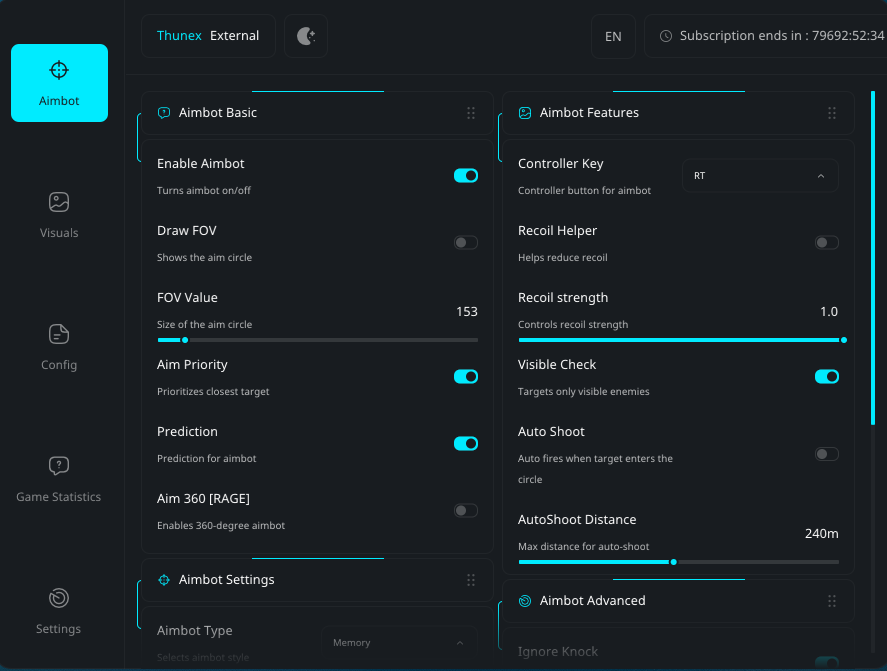
<div align="left" data-full-width="false"><figure><img src="https://content.gitbook.com/content/xZuDAScHwskuWmm8MVea/blobs/XvItwYJcgC1XsnccVi51/DSAwHDx.png" alt="Thunex menu overview"><figcaption><p>Thunex menu overview</p></figcaption></figure></div>

* This guide lists Windows 10 and Windows 11 support, with a built-in spoofer.
* Controller support, adjustable Aimbot and ESP, and saved profiles are available in the menu.

## Aimbot Basic <a href="#options-1" id="options-1"></a>

<table data-full-width="false"><thead><tr><th>Option</th><th>What it does</th></tr></thead><tbody><tr><td><strong>Enable Aimbot</strong></td><td>Turns on the aimbot</td></tr><tr><td><strong>Draw FOV</strong></td><td>Shows the aim range circle</td></tr><tr><td><strong>Aim Priority</strong></td><td>Controls target priority</td></tr><tr><td><strong>Aim 360 (Rage)</strong></td><td>Full 360 strong aim (rage)</td></tr><tr><td><strong>Recoil Helper</strong></td><td>Helps reduce recoil</td></tr><tr><td><strong>Recoil Helper Slider</strong></td><td>Adjust recoil strength</td></tr></tbody></table>

## Aimbot Settings <a href="#options-2" id="options-2"></a>

<table data-full-width="false"><thead><tr><th>Option</th><th>What it does</th></tr></thead><tbody><tr><td><strong>Aimbot Type</strong></td><td>Choose how aiming works</td></tr><tr><td><strong>Aim Bone</strong></td><td>Select target bone (head / chest)</td></tr><tr><td><strong>Mouse Key</strong></td><td>Key to activate aimbot</td></tr><tr><td><strong>Aim Type</strong></td><td>Type of aiming behavior</td></tr></tbody></table>

## Aimbot Features <a href="#options-3" id="options-3"></a>

<table data-full-width="false"><thead><tr><th>Option</th><th>What it does</th></tr></thead><tbody><tr><td><strong>Controller Key</strong></td><td>Full controller support</td></tr><tr><td><strong>Visible Check</strong></td><td>Targets only visible enemies</td></tr><tr><td><strong>Auto Shoot</strong></td><td>Shoots automatically</td></tr><tr><td><strong>Auto Shoot Distance</strong></td><td>Control auto-shoot range</td></tr></tbody></table>

## Aimbot Advanced <a href="#options-4" id="options-4"></a>

<table data-full-width="false"><thead><tr><th>Option</th><th>What it does</th></tr></thead><tbody><tr><td><strong>Ignore Knock</strong></td><td>Ignores downed players</td></tr><tr><td><strong>Ignore BOT / AI</strong></td><td>Ignores bots</td></tr><tr><td><strong>Draw Crosshair</strong></td><td>Shows extra crosshair</td></tr><tr><td><strong>Lock Target</strong></td><td>Locks onto one target</td></tr><tr><td><strong>Smooth</strong></td><td>Controls aim smoothness</td></tr><tr><td><strong>FOV Value</strong></td><td>Adjust aim circle size</td></tr><tr><td><strong>Distance Aim</strong></td><td>Controls aim distance</td></tr></tbody></table>

## ESP Basic <a href="#options-5" id="options-5"></a>

<table data-full-width="false"><thead><tr><th>Option</th><th>What it does</th></tr></thead><tbody><tr><td><strong>Visual ESP</strong></td><td>Enables player visuals</td></tr><tr><td><strong>Player Boxes</strong></td><td>Boxes around players</td></tr><tr><td><strong>HP Indicator</strong></td><td>Shows player health</td></tr><tr><td><strong>Name Tags</strong></td><td>Shows player names</td></tr></tbody></table>

## ESP Info <a href="#options-6" id="options-6"></a>

<table data-full-width="false"><thead><tr><th>Option</th><th>What it does</th></tr></thead><tbody><tr><td><strong>Kill Tags</strong></td><td>Shows kills</td></tr><tr><td><strong>Ping Tags</strong></td><td>Shows ping</td></tr><tr><td><strong>Distance Indicator</strong></td><td>Shows distance to players</td></tr><tr><td><strong>ESP Distance</strong></td><td>Controls ESP range</td></tr></tbody></table>

## ESP Visuals <a href="#options-7" id="options-7"></a>

<table data-full-width="false"><thead><tr><th>Option</th><th>What it does</th></tr></thead><tbody><tr><td><strong>Squad ID</strong></td><td>Shows team ID</td></tr><tr><td><strong>Directional Arrows</strong></td><td>Arrows pointing to enemies</td></tr><tr><td><strong>Arrows FOV</strong></td><td>Arrow display range</td></tr><tr><td><strong>Draw Team</strong></td><td>Shows your team</td></tr><tr><td><strong>Dynamic Arrows</strong></td><td>Moving direction arrows</td></tr><tr><td><strong>Show Weapon Icon</strong></td><td>Shows player weapon</td></tr><tr><td><strong>Web Share Radar</strong></td><td>Share radar via link</td></tr><tr><td><strong>Show UAV</strong></td><td>Shows UAV</td></tr></tbody></table>

## ESP Advanced <a href="#options-8" id="options-8"></a>

<table data-full-width="false"><thead><tr><th>Option</th><th>What it does</th></tr></thead><tbody><tr><td><strong>Skeleton</strong></td><td>Shows player skeleton</td></tr><tr><td><strong>Snaplines</strong></td><td>Lines to enemies</td></tr><tr><td><strong>Snaplines Type</strong></td><td>Choose line style</td></tr><tr><td><strong>Draw Radar</strong></td><td>Enable radar</td></tr><tr><td><strong>Radar Distance</strong></td><td>Radar range</td></tr><tr><td><strong>Radar Type</strong></td><td>Radar style</td></tr></tbody></table>

## Config System <a href="#options-9" id="options-9"></a>

<table data-full-width="false"><thead><tr><th>Option</th><th>What it does</th></tr></thead><tbody><tr><td><strong>Save Profiles</strong></td><td>Save your settings</td></tr><tr><td><strong>Load Profiles</strong></td><td>Load saved profiles</td></tr><tr><td><strong>Reset Config</strong></td><td>Reset all settings</td></tr></tbody></table>

## Menu Settings <a href="#options-10" id="options-10"></a>

<table data-full-width="false"><thead><tr><th>Option</th><th>What it does</th></tr></thead><tbody><tr><td><strong>Change Menu Color</strong></td><td>Change menu color</td></tr><tr><td><strong>Unlock</strong></td><td>Unlock content.</td></tr><tr><td><strong>Detect Cheaters</strong></td><td>Alerts you if cheaters are in your match</td></tr></tbody></table>

## Need a hand? <a href="#support" id="support"></a>

<mark style="color:$secondary;">**SIGN SUPPORT**</mark>

The Sign team is here to help. Open a Discord ticket and include the page name, the step you reached, and a screenshot of the issue so we can help you more clearly.

<a href="https://discord.gg/siin" class="button primary" data-icon="discord">Get help on Discord</a> <a href="https://www.signcod.com/ar" class="button secondary" data-icon="globe">Visit Sign Website</a>


---

# Agent Instructions
This documentation is published with GitBook. GitBook is the documentation platform designed so that both humans and AI agents can read, navigate, and reason over technical content effectively. Learn more at gitbook.com.

## Querying This Documentation
If you need additional information that is not directly available in this page, you can query the documentation by asking a question.

Perform an HTTP GET request on the following URL with the `ask` and `goal` query parameters:

```
GET https://docs.signcod.com/sign/english/games/black-ops-7/thonix-external/menu.md?ask=<question>&goal=<user_goal>
```

`ask` is the immediate question: it should be specific, self-contained, and written in natural language.
`goal` is what the user is ultimately trying to achieve, the reason they need the answer. Sharing it helps GitBook give you a better, more relevant answer. A goal is most helpful when it describes the outcome the user wants rather than restating the question. For example, with `ask=how do I create an API token`, a goal like `automate deployments from our CI pipeline` lets GitBook tailor the answer to that use case.

The response will contain a direct answer to the question and relevant excerpts and sources from the documentation.

Use this mechanism when the answer is not explicitly present in the current page, you need clarification or additional context, or you want to retrieve related documentation sections.
