> For the complete documentation index, see [llms.txt](https://docs.signcod.com/llms.txt). Markdown versions of documentation pages are available by appending `.md` to page URLs; this page is available as [Markdown](https://docs.signcod.com/games/modern-warfare-4/ka/installation.md).

# ⁧تحميل⁩

⁧جهّز ميدل، فعّل كي إيه، ثم افتح القائمة داخل اللعبة.⁩

<p align="right">⁧<mark style="color:$primary;"><strong>ساين · كي إيه</strong></mark>⁩</p>

<p align="right">⁧اتبع هذا الترتيب في جميع الألعاب التي يتوفر فيها كي إيه: <strong>متطلبات النظام ← ميدل ← لودر كي إيه</strong>.⁩</p>

<h2 id="requirements" align="right">⁧1 · أكمل متطلبات النظام⁩</h2>

<p align="right">⁧أكمل خطوات متطلبات النظام أولًا، ثم ارجع إلى هذه الصفحة.⁩</p>

<p align="right"><a href="/basics/prepare-your-pc/pc-requirements.md" class="button primary" data-icon="desktop">⁧افتح متطلبات النظام⁩</a></p>

<h2 id="medal" align="right">⁧2 · اضبط ميدل⁩</h2>

{% stepper %}
{% step %}

<h3 id="nz-l-mydl-wsj-l-aldkhwl" align="right">⁧نزّل ميدل وسجّل الدخول⁩</h3>

<p align="right">⁧نزّل <strong>ميدل</strong> وأكمل التثبيت، ثم افتحه وسجّل الدخول أو أنشئ حسابًا.⁩</p>

<p align="right"><a href="https://medal.tv/" class="button secondary" data-icon="download">⁧تحميل ميدل⁩</a></p>
{% endstep %}

{% step %}

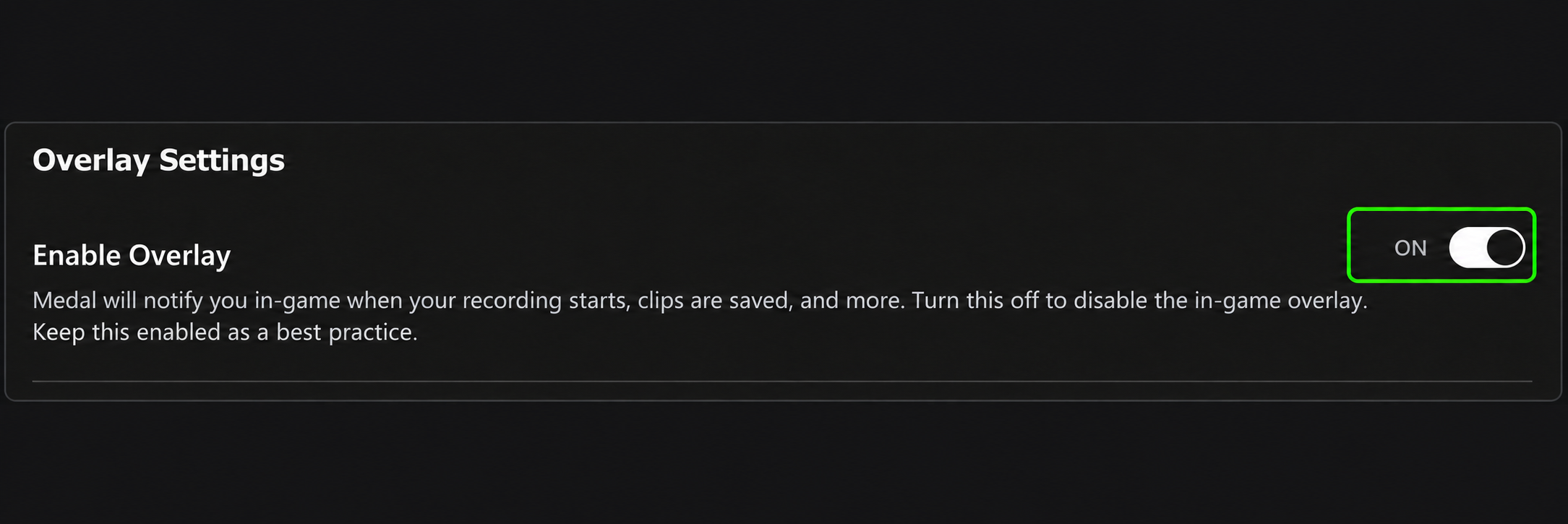
<h3 id="fa-l-altrakb" align="right">⁧فعّل التراكب⁩</h3>

<p align="right">⁧من القائمة الجانبية افتح <strong>إعدادات التطبيق → التراكب</strong>، واجعل <strong>تفعيل التراكب = تشغيل</strong>. أبقِ هذا الخيار مفعّلًا.⁩</p>

<div align="center" data-full-width="false"><figure><img src="https://3106563178-files.gitbook.io/~/files/v0/b/gitbook-x-prod.appspot.com/o/spaces%2F6H76Ihphpr6NjelUu4Lf%2Fuploads%2F05ctLgim0nTNE5fa4G8w%2Foverlay-tab.webp?alt=media" alt="موقع التراكب ضمن إعدادات التطبيق" width="320"><figcaption><p align="right">⁧موقع التراكب ضمن إعدادات التطبيق⁩</p></figcaption></figure></div>

<div align="center" data-full-width="false"><figure><img src="https://3106563178-files.gitbook.io/~/files/v0/b/gitbook-x-prod.appspot.com/o/spaces%2F6H76Ihphpr6NjelUu4Lf%2Fuploads%2FyimijuqThNiu7am4r73y%2Foverlay-on.webp?alt=media" alt="تفعيل التراكب = تشغيل"><figcaption><p align="right">⁧تفعيل التراكب = تشغيل⁩</p></figcaption></figure></div>
{% endstep %}

{% step %}

<h3 id="awqf-altqat-almqata" align="right">⁧أوقف التقاط المقاطع⁩</h3>

<p align="right">⁧افتح <strong>إعدادات المقاطع</strong> واجعل <strong>تسجيل المقاطع = إيقاف</strong>.⁩</p>

<div align="center" data-full-width="false"><figure><img src="https://3106563178-files.gitbook.io/~/files/v0/b/gitbook-x-prod.appspot.com/o/spaces%2F6H76Ihphpr6NjelUu4Lf%2Fuploads%2F9MI1oAuPiFPwJ8uKR5N9%2Fcapture-clips-off.webp?alt=media" alt="إعدادات المقاطع · تسجيل المقاطع = إيقاف"><figcaption><p align="right">⁧إعدادات المقاطع · تسجيل المقاطع = إيقاف⁩</p></figcaption></figure></div>
{% endstep %}

{% step %}

<h3 id="awqf-trakb-alfydyw-walkamyra-alaftradhyh" align="right">⁧أوقف تراكب الفيديو والكاميرا الافتراضية⁩</h3>

<p align="right">⁧افتح <strong>تراكب الفيديو</strong> وأوقف الخيارين:⁩</p>

<p align="right">⁧<mark style="color:$primary;"><strong>•</strong></mark><strong> تراكب الفيديو = إيقاف</strong>⁩</p>

<p align="right">⁧<mark style="color:$primary;"><strong>•</strong></mark><strong> تسجيل الكاميرا الافتراضية = إيقاف</strong>⁩</p>

<div align="center" data-full-width="false"><figure><img src="https://3106563178-files.gitbook.io/~/files/v0/b/gitbook-x-prod.appspot.com/o/spaces%2F6H76Ihphpr6NjelUu4Lf%2Fuploads%2FWIrWmThFnFZbKje3TyoW%2Fvideo-overlay-off.webp?alt=media" alt="تراكب الفيديو وتسجيل الكاميرا الافتراضية = إيقاف"><figcaption><p align="right">⁧تراكب الفيديو وتسجيل الكاميرا الافتراضية = إيقاف⁩</p></figcaption></figure></div>
{% endstep %}

{% step %}

<h3 id="awqf-alaltqat-altlqaey" align="right">⁧أوقف الالتقاط التلقائي⁩</h3>

<p align="right">⁧افتح <strong>الالتقاط التلقائي للمقاطع</strong> واجعل <strong>التقاط الأحداث تلقائيًا = إيقاف</strong>.⁩</p>

<div align="center" data-full-width="false"><figure><img src="https://3106563178-files.gitbook.io/~/files/v0/b/gitbook-x-prod.appspot.com/o/spaces%2F6H76Ihphpr6NjelUu4Lf%2Fuploads%2FY1r2qwJxT7l2mDDpUsEM%2Fauto-clipping-off.webp?alt=media" alt="الالتقاط التلقائي للمقاطع · التقاط الأحداث تلقائيًا = إيقاف"><figcaption><p align="right">⁧الالتقاط التلقائي للمقاطع · التقاط الأحداث تلقائيًا = إيقاف⁩</p></figcaption></figure></div>
{% endstep %}

{% step %}

<h3 id="akml-althyeh-waad-tshghyl-aljhaz" align="right">⁧أكمل التهيئة وأعد تشغيل الجهاز⁩</h3>

<p align="right">⁧<mark style="color:$primary;"><strong>•</strong></mark> عطّل أي تراكب آخر تستخدمه: <strong>دسكورد</strong> أو <strong>تطبيق إنفيديا أو جي فورس إكسبيرينس</strong> أو <strong>إيه إم دي أدرينالين</strong> أو <strong>ستيم</strong>.⁩</p>

<p align="right">⁧<mark style="color:$primary;"><strong>•</strong></mark> اضغط <code>كنترول + شفت + هروب</code>، وافتح <strong>تطبيقات بدء التشغيل</strong>. اضغط بزر الفأرة الأيمن على كل تطبيق في القائمة واختر <strong>تعطيل</strong>.⁩</p>

<p align="right">⁧<mark style="color:$primary;"><strong>•</strong></mark><strong> أعد تشغيل الجهاز قبل المتابعة؛ هذه الخطوة مطلوبة.</strong>⁩</p>
{% endstep %}
{% endstepper %}

<h2 id="checklist" align="right">⁧راجع الإعدادات⁩</h2>

<table data-full-width="false"><thead><tr><th align="right">⁧الصفحة⁩</th><th align="right">⁧الإعداد⁩</th><th align="right">⁧الحالة⁩</th></tr></thead><tbody><tr><td align="right">⁧التراكب⁩</td><td align="right">⁧تفعيل التراكب⁩</td><td align="right">⁧<strong>تشغيل</strong>⁩</td></tr><tr><td align="right">⁧إعدادات المقاطع⁩</td><td align="right">⁧تسجيل المقاطع⁩</td><td align="right">⁧<strong>إيقاف</strong>⁩</td></tr><tr><td align="right">⁧تراكب الفيديو⁩</td><td align="right">⁧تراكب الفيديو، تسجيل الكاميرا الافتراضية⁩</td><td align="right">⁧<strong>إيقاف</strong>⁩</td></tr><tr><td align="right">⁧الالتقاط التلقائي للمقاطع⁩</td><td align="right">⁧التقاط الأحداث تلقائيًا⁩</td><td align="right">⁧<strong>إيقاف</strong>⁩</td></tr></tbody></table>

<h2 id="loader" align="right">⁧3 · شغّل كي إيه⁩</h2>

{% stepper %}
{% step %}

<h3 id="afth-mydl-wsgh-rh" align="right">⁧افتح ميدل وصغّره⁩</h3>

<p align="right">⁧بعد إعادة التشغيل، افتح <strong>ميدل</strong> وسجّل الدخول. تأكد أن الإعدادات تطابق الجدول أعلاه، ثم ارجع إلى نافذته الرئيسية وصغّره إلى شريط المهام.⁩</p>

<p align="right">⁧<mark style="color:$secondary;"><strong>تنبيه:</strong></mark><strong> </strong><mark style="color:$danger;"><strong>اترك ميدل شغالًا ومصغّرًا طوال الاستخدام. لا تغلقه بالكامل.</strong></mark>⁩</p>
{% endstep %}

{% step %}

<h3 id="afth-lwdr-ky-iyh-wfa-l-alkwd" align="right">⁧افتح لودر كي إيه وفعّل الكود⁩</h3>

<p align="right">⁧نزّل اللودر من الزر وافتحه، ثم فعّل الكود الخاص بك وتأكد من اللعبة المعروضة.⁩</p>

<p align="right"><a href="https://mega.nz/file/yp82kYZT#ZTFCDmqpA5VH2qS-GkD9KZESZXVCfX7tzaDKNd3KrVc" class="button secondary" data-icon="download">⁧تحميل لودر كي إيه⁩</a></p>
{% endstep %}

{% step %}

<h3 id="adhght-bda-wantzr-njah-alamlyh" align="right">⁧اضغط بدء وانتظر نجاح العملية⁩</h3>

<p align="right">⁧تأكد أن <strong>ميدل ما زال شغالًا ومصغّرًا</strong>، ثم اضغط <strong>بدء</strong> في اللودر. انتظر رسالة <strong>نجاح العملية</strong> واضغط <strong>موافق</strong>.⁩</p>
{% endstep %}

{% step %}

<h3 id="adkhl-allabh-wafth-alqaemh" align="right">⁧ادخل اللعبة وافتح القائمة⁩</h3>

<p align="right">⁧شغّل اللعبة؛ ستظهر القائمة داخلها. استخدم <code>إنسرت</code> لإخفاء القائمة أو إظهارها، مع إبقاء ميدل شغالًا في الخلفية.⁩</p>
{% endstep %}
{% endstepper %}

<h2 id="support" align="right">⁧تحتاج مساعدة؟⁩</h2>

<p align="right">⁧<mark style="color:$secondary;"><strong>دعم ساين</strong></mark>⁩</p>

<p align="right">⁧فريق ساين معك. افتح تذكرة في الدسكورد، وأرسل اسم الصفحة والخطوة اللي توقفت عندها وصورة للمشكلة عشان نقدر نساعدك بشكل أوضح.⁩</p>

<p align="right"><a href="https://discord.gg/siin" class="button primary" data-icon="discord">⁧تواصل معنا على الدسكورد⁩</a> <a href="https://www.signcod.com/ar" class="button secondary" data-icon="globe">⁧موقع ساين الرسمي⁩</a></p>


---

# Agent Instructions
This documentation is published with GitBook. GitBook is the documentation platform designed so that both humans and AI agents can read, navigate, and reason over technical content effectively. Learn more at gitbook.com.

## Querying This Documentation
If you need additional information that is not directly available in this page, you can query the documentation by asking a question.

Perform an HTTP GET request on the following URL with the `ask` and `goal` query parameters:

```
GET https://docs.signcod.com/games/modern-warfare-4/ka/installation.md?ask=<question>&goal=<user_goal>
```

`ask` is the immediate question: it should be specific, self-contained, and written in natural language.
`goal` is what the user is ultimately trying to achieve, the reason they need the answer. Sharing it helps GitBook give you a better, more relevant answer. A goal is most helpful when it describes the outcome the user wants rather than restating the question. For example, with `ask=how do I create an API token`, a goal like `automate deployments from our CI pipeline` lets GitBook tailor the answer to that use case.

The response will contain a direct answer to the question and relevant excerpts and sources from the documentation.

Use this mechanism when the answer is not explicitly present in the current page, you need clarification or additional context, or you want to retrieve related documentation sections.